
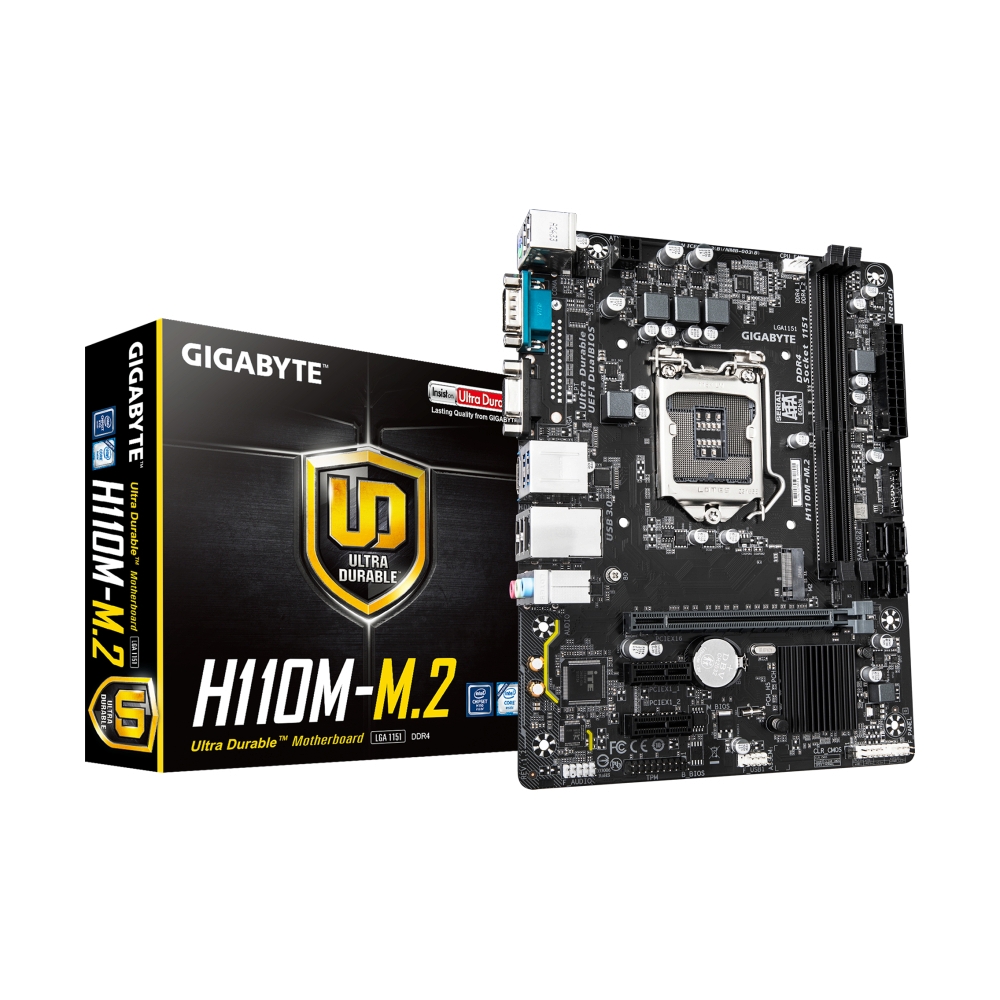
MAINBOARD (1151) GIGABYTE H110M-M.2 DDR4 (REV. 1.2)
- Support CPU : Core™ i7 / i5 / i3 / Pentium® / Celeron® / Supports Intel 6th, 7th Generation
- Chipset : Intel H110 Chipset
- Form Factor : Micro ATX
- Memory Channel : Dual Channel DDR4 2DIMM
- Memory Support : up to 2400
- Memory MAX : 32GB
- M.2 Slot : 1 slot
- SATA III 6G : 4 ports
- PCIe 3.0x16 : 1 slot
- Lan Port : 1 Gigabit LAN
- Ultra-Fast M.2 with PCIe Gen2 x2 & SATA mode support
- 8-channel HD Audio with High Quality Audio Capacitors
- Audio Noise Guard with LED Trace Path Lighting
- GbE LAN with cFosSpeed Internet Accelerator Software
- All new GIGABYTE™ APP Center, simple and easy use
- Support Intel® Small Business Basics
รายละเอียดสินค้า

อ้างอิงจาก : www.gigabyte.com
ข้อมูลผลิตภัณฑ์
H110M-M.2 DDR4 (REV. 1.2)
Support for 7th and 6th Generation:
Intel® Core™ i7 processors/Intel® Core™ i5 processors/Intel® Core™ i3 processors/
Intel® Pentium® processors/Intel® Celeron® processors in the LGA1151 package
(Go to GIGABYTE's website for the latest CPU support list.)
L3 cache varies with CPU
Intel
1151
Intel H110
2 x DDR4 DIMM sockets supporting up to 32 GB of system memory
* Due to a Windows 32-bit operating system limitation, when more than 4 GB of physical memory is installed, the actual memory size displayed will be less than the size of the physical memory installed.
Dual channel memory architecture
Support for DDR4 2400/2133 MHz memory modules
Support for ECC Un-buffered DIMM 1Rx8/2Rx8 memory modules (operate in non-ECC mode)
Support for non-ECC Un-buffered DIMM 1Rx8/2Rx8/1Rx16 memory modules
Support for Extreme Memory Profile (XMP) memory modules
* To support 2400 MHz or XMP memory, you must install an Intel® Core™ i7 / i5 processor of the 7th generation.
(Go to GIGABYTE's website for the latest supported memory speeds and memory
modules.)
2400
Integrated Graphics Processor-Intel® HD Graphics support:
- 1 x D-Sub port, supporting a maximum resolution of 1920x1200@60 Hz
- 1 x HDMI port, supporting a maximum resolution of 4096x2160@24 Hz
* Support for HDMI 1.4 version.
Maximum shared memory of 512 MB
None
Realtek® Audio CODEC
High Definition Audio
2/4/5.1/7.1-channel
* You can change the functionality of an audio jack using the audio software. To configure 7.1-channel audio, access the audio software for audio settings.
1 x PCI Express x16 slot, supporting PCIe 3.0 and running at x16 (PCIEX16)
* The PCIEX16 slot can only support a graphics card or an NVMe SSD.
2 x PCI Express x1 slots, supporting PCIe 2.0 and running at x1 (PCIEX1_1, PCIEX1_2)
PCIe 3.0
Chipset:
- 1 x M.2 connector (Socket 3, M key, type 2280 SATA and PCIe x2 SSD support)
- 4 x SATA 6Gb/s connectors
* Refer to "2-7 Internal Connectors," for the installation notices for the M.2 and SATA connectors.
NVMe, SATA
1
Chipset:
- 4 x USB 3.2 Gen 1 ports (2 ports on the back panel, 2 ports available through the internal USB header)
- 6 x USB 2.0/1.1 ports (4 ports on the back panel, 2 ports available through the internal USB header)
1 x 24-pin ATX main power connector
1 x 4-pin ATX 12V power connector
1 x CPU fan header
1 x system fan header
1 x M.2 Socket 3 connector
4 x SATA 6Gb/s connectors
1 x front panel header
1 x front panel audio header
1 x USB 3.2 Gen 1 header
1 x USB 2.0/1.1 header
1 x Trusted Platform Module (TPM) header
1 x Clear CMOS jumper
1 x PS/2 keyboard/mouse port
1 x serial port
1 x D-Sub port (Note)
1 x HDMI port (Note)
2 x USB 3.2 Gen 1 ports
4 x USB 2.0/1.1 ports
1 x RJ-45 port
3 x audio jacks
(Note) Actual support may vary by CPU.
Realtek® GbE LAN chip (1 Gbps/100 Gbps/10 Mbps)
None
Micro ATX
Voltage detection
Temperature detection
Fan speed detection
Overheating warning
Fan fail warning
Fan speed control
* Whether the fan speed control function is supported will depend on the fan you install.
1 x 64 Mbit flash
Use of licensed AMI UEFI BIOS
PnP 1.0a, DMI 2.7, WfM 2.0, SM BIOS 2.7, ACPI 5.0
N/A
Norton® Internet Security (OEM version)
LAN bandwidth management software
Support for Windows 10/8.1 64-bit
Support for Windows 7 32-bit/64-bit
* Please download the "Windows USB Installation Tool" from GIGABYTE's website and install it before installing Windows 7.
N/A